Saturday, November 7, 2009

Hacking Online Banking and Credit Card Transactions – And How to Prevent It

Here is process for hacking online banking and credit cards transactions and also a process to prevent from them .
The Scenario You go to a coffee shop for a cup of coffee and to utilize the shop’s Wi-Fi HotSpot to surf the web. You connect to the hotspot network and decide to perform some online banking or to purchase something online. By the way, this could happen to you at home, as well. As an end-user, you feel quite secure, as you see the lock in the bottom corner of your Internet browser, symbolizing that the online banking or online credit card transaction is safe from prying eyes. Your data, including username, password, credit card info, etc. will be encrypted with 128-bit encryption. So it's secure, right?

It is not uncommon to perform banking and to purchase products online with your credit card. It is also a common thought that doing so is secure, as this is done via SSL. For the most part, this is true and the sessions are secure. Discover Card, for example, posts the following statement on their website:
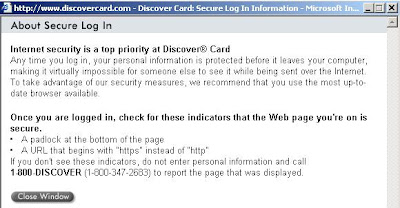

Figure 1

The problem is that it is not “virtually impossible” for someone else to see your data, such as login information or credit card numbers. It can actually be relatively easy, as you’ll see, if you as an end-user are not knowledgeable about how you can be exploited and know the signs that this is occurring.


Figure 2 (Indicates a Secure SSL Session)

Continuing with the scenario, what you didn’t realize is that a hacker has intercepted your Online Banking login credentials and credit card information and can now log into your Online Banking Website or purchase items with your credit card. How is this possible, since SSL was used and is hard to break? The answer is that you made a fatal mistake that subjected you to an SSL Man-in-the-Middle (MITM) attack.
The Attack The fatal flaw that enabled the sensitive information to be stolen is possible when an end-user is not properly educated on an easy to do and well-known SSL exploit – SSL MITM.
Here’s how it’s done:
The hacker goes to coffee shop and connects to the same Wi-Fi network you are connected to. He runs a series of utilities to redirect other user’s data through his machine. He runs a number of other utilities to sniff the data, act as an SSL Certificate Server and to be the Man-the-Middle. The following diagram shows a very simplified graphic of how your SSL Banking session should work under normal conditions, then how it would work during an attack:

Figure 3

Figure 4
An important concept to grasp here is that a certificate is used to establish the secure SSL connection. This is a good thing, if you have a good certificate and are connecting directly to the website to which you intended to use. Then all your data is encrypted from your browser to the SSL website where the bank’s website will use the information from the certificate it gave you to decrypt your data/credentials. If that is truly the case, then it is pretty darn hard for a hacker to decrypt the data/credentials being transmitted, even if he is able to sniff your data.
This is a bad thing if you have a “Fake” certificate being sent from the hacker, and you are actually connecting to his machine, not directly to the bank’s website. In this case, your credentials are being transmitted between your browser and the hacker’s machine. The hacker is able to grab that traffic, and, because he gave you the certificate to encrypt the data/credentials, he can use that same certificate to decrypt your data/credentials.
Here are the exact steps a hacker could use to perform this attack:
The first thing he would do is turn on Fragrouter, so that his machine can perform IP forwarding

Figure 5
After that, he’ll want to direct your Wi-Fi network traffic to his machine instead of your data traffic going directly to the Internet. This enables him to be the “Man-in-the-Middle” between your machine and the Internet. Using Arpspoof, a real easy way to do this, he determines your IP address is 192.168.1.15 and the Default Gateway of the Wi-Fi network is 192.168.1.1:

Figure 6
The next step is to enable DNS Spoofing via DNSSpoof:

Figure 7
Since he will be replacing the Bank's or Online Store’s valid certificate with his own fake one, he will need to turn on the utility to enable his system to be the Man-in-the-Middle for web sessions and to handle certificates. This is done via webmitm:

Figure 8
At this point, he is setup and ready to go, he now needs to begin actively sniffing your data passing through his machine including your login information and credit card info. He opts to do this with Ethereal, then saves his capture:

Figure 9
He now has the data, but it is still encrypted with 128-bit SSL. No problem, since he has the key. What he simply needs to do now is decrypt the data using the certificate that he gave you. He does this with SSL Dump:

Figure 10
The data is now decrypted and he runs a Cat command to view the now decrypted SSL information. Note that the username is “Bankusername” and the password is “BankPassword”. Conveniently, this dump also shows that the Banking site as National City. FYI, the better, more secure banking and online store websites will have you first connect to another, preceeding page via SSL, prior to connecting to the page where you enter the sensitive information such as bank login credentials or credit card numbers. The reason for this is to stop the MITM-type attack. How this helps is that if you were to access this preceeding page first with a "fake" certificate and then proceeded to the next page where you were to enter the sensitve information, that page where you would enter the sensitive information would not display. That is because the page gathering the sensitive information would be expecting a valid certificate, which it would not receive because of the Man-in-the-Middle. While some online banks and stores do implement this extra step/page for security reasons, the real flaw in this attack is the uneducated end-user, as you'll soon see:

Figure 11
With this information, he can now log into your Online Banking Account with the same access and privileges as you. He could transfer money, view account data, etc.
Below is an example of a sniffed SSL credit card purchase/transaction. You can see that Elvis Presley was attempting to make a purchase with his credit card 5440123412341234 with an expiration date of 5/06 and the billing address of Graceland in Memphis, TN (He is alive!). If this was your information, the hacker could easily make online purchases with your card.

Figure 12
Also Real Bad News for SSL VPN Admins This type of attack could be particularly bad for corporations. The reason for this is that Corporate SSL VPN solutions are also vulnerable to this type of attack. Corporate SSL VPN solutions will often authenticate against Active Directory, the NT Domain, LDAP or some other centralized credentials data store. Sniffing the SSL VPN login then gives an attacker valid credentials to the corporate network and other systems.
What an End-User Needs To Know There’s a big step and end-user can take to prevent this from taking place. When the MITM Hacker uses the “bad” certificate instead of the “good”, valid certificate, the end-user is actually alerted to this. The problem is that most end-users don’t understand what this means and will unknowingly agree to use the fake certificate. Below is an example of the Security Alert an end-user would receive. Most uneducated end-users would simply click “Yes”… and this is the fatal flaw:

Figure 13
By clicking “Yes”, they have set themselves up to be hacked. By clicking the “View Certificate” button, the end-user would easily see that there is a problem. Below are examples of the various certificate views/tabs that show a good certificate compared to the bad certificate:

Figure 14
(Good Certificate) (Bad Certificate)

Figure 15
(Good Certificate) (Bad Certificate)
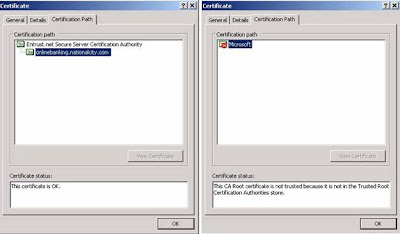
Figure 16
(Good Certificate) (Bad Certificate)
How an End-User Can Prevent This
Again, the simple act of viewing the certificate and clicking “No” would have prevented this from happening.
Education is the key for an end-user. If you see this message, take the time to view the certificate. As you can see from the examples above, you can tell when something doesn’t look right. If you can’t tell, err on the side of caution and call your Online Bank or the Online store.
Take the time to read and understand all security messages you receive. Don’t just randomly click yes out of convenience.
How a Corporation Can Prevent This
Educate the end-user on the Security Alert and how to react to it.
Utilize One Time Passwords, such as RSA Tokens, to prevent the reuse of sniffed credentials.
When using SSL VPN, utilize mature products with advanced features, such as Juniper’s Secure Application Manager or Network Connect functionality.
Read more »

Is Mail Hacking possible?

This topic is favourite of all newbies
EMAIL PASSWORD HACKING
First of all it is very difficult to crack any mail server
like yahoo,google,msn etc.
ANd even if you crack into their server it is not possible to decode the password
so just forget about this method
We will try something different

If u have physical access(direct access) to someone's PC and u want to hack his account password then it is the best thing for us.U don't need anything better than that,all u hv to do is to download a good keylogger to ur pc and copy it in ur pendrive or cd
and install the keylogger in the victim's pc.That's it.

KEYLOGGER:-This are the program which records the every keystrokes on keyboard which means it will record all passwords also.The data will be stored on the victims computer only(they r stored in one file which is usually located in system folder) but as u hv physical access u can access this file easily
some keyloggers are hidden so the victim will not hv ne clue abt it and ur work will be done easily.click here to see how it works

Most of u will say that u don't hv direct access to the victim's pc.It is little difficult to get password if u don't hv direct access to victim's pc.
In this kinda situations u can use trojan's for this.There r many trojans available on internet.U can find many using google.If u want u can scrap in my orkut profile

http://www.orkut.co.in/Main#Profile.aspx?uid=17508292249981249367

Well of course most of you out there will say that you don't have physical access to your target's computer. That's fine, there still are ways you can gain access into the desired email account without having to have any sort of physical access. For this we are going to go back onto the RAT topic, to explain methods that can be used to fool the user into running the server portion of the RAT (again, a RAT is a trojan) of your choice. Well first we will discuss the basic "send file" technique. This is simply convincing the user of the account you want to access to execute the server portion of your RAT.

To make this convincing, what you will want to do is bind the server.exe to another *.exe file in order to not raise any doubt when the program appears to do nothing when it is executed. For this you can use the tool like any exe file to bind it into another program (make it something like a small game)...

On a side note, make sure the RAT of your choice is a good choice. The program mentioned in the previous section would not be good in this case, since you do need physical access in order to set it up. You will have to find the program of your choice yourself (meaning please don't ask around for any, people consider that annoying behavior).

If you don't like any of those, I'm afraid you are going to have to go to www.google.com, and look for some yourself. Search for something like "optix pro download", or any specific trojan. If you look long enough, among all the virus notification/help pages, you should come across a site with a list of RATs for you to use (you are going to eventually have to learn how to navigate a search engine, you can't depend on handouts forever). Now back to the topic at hand, you will want to send this file to the specified user through an instant messaging service.

The reason why is that you need the ip address of the user in order to connect with the newly established server. Yahoo! Messenger, AOL Instant Messenger, it really doesn't matter. What you will do is send the file to the user. Now while this transfer is going on you will go to Start, then Run, type in "command", and press Enter. Once the msdos prompt is open, type in "netstat -n", and again, press enter. You will see a list of ip addresses from left to right. The address you will be looking for will be on the right, and the port it's established on will depend on the instant messaging service you are using. With MSN Messenger it will be remote port 6891, with AOL Instant Messenger it will be remote port 2153, with ICQ it will be remote port 1102, 2431, 2439, 2440, or 2476, and with Yahoo! Messenger it will be remote port 1614.

So once you spot the established connection with the file transfer remote port, then you will take note of the ip address associated with that port. So once the transfer is complete, and the user has executed the server portion of the RAT, then you can use the client portion to sniff out his/her password the next time he/she logs on to his/her account.

Don't think you can get him/her to accept a file from you? Can you at least get him/her to access a certain web page? Then maybe this next technique is something you should look into.

Currently Internet Explorer is quite vulnerable to an exploit that allows you to drop and execute .exe files via malicious scripting within an html document. For this what you will want to do is set up a web page, make sure to actually put something within this page so that the visitor doesn't get too entirely suspicious, and then imbed the below script into your web page so that the server portion of the RAT of your choice is dropped and executed onto the victim's computer...

While you are at it, you will also want to set up an ip logger on the web page so that you can grab the ip address of the user so that you can connect to the newly established server. Here is the source for a php ip logger you can use on your page...

http://www.planet-source-code.com/vb/scripts/ShowCode.asp?txtCodeId=539&lngWId=8

Just insert this source into your page along with the exedrop script, and you are set. Just convince the user to go to this page, and wait till the next time they type in their email password. However, what do you do if you can not contact this user in any way to do any of the above tricks. Well, then you definately have your work cut out for you. It doesn't make the task impossible, but it makes it pretty damn close to it. For this we will want to try info cracking. Info cracking is the process of trying to gather enough information on the user to go through the "Forgot my Password" page, to gain access into the email account.

If you happen to know the user personally, then it helps out a lot. You would then be able to get through the birthday/ zipcode questions with ease, and with a little mental backtracking, or social engineering (talking) out the information from the user be able to get past the secret question. However, what do you do if you do not have this luxury? Well in this case you will have to do a little detective work to fish out the information you need.

First off, if a profile is available for the user, look at the profile to see if you can get any information from the profile. Many times users will put information into their profile, that may help you with cracking the account through the "Forgot my Password" page (where they live, their age, their birthday if you are lucky). If no information is provided then what you will want to do is get on an account that the user does not know about, and try to strike conversation with the user. Just talk to him/her for a little while, and inconspicuously get this information out of the user (inconspicuously as in don't act like you are trying to put together a census, just make casual talk with the user and every once in a while ask questions like "When is your birthday?" and "Where do you live?", and then respond with simple, casual answers).


Once you have enough information to get past the first page, fill those parts out, and go to the next page to find out what the secret question is. Once you have the secret question, you will want to keep making casual conversation with the user and SLOWLY build up to asking a question that would help you answer the secret question. Don't try to get all the information you need in one night or you will look suspicious. Patience is a virtue when info cracking. Just slowly build up to this question. For example, if the secret question is something like "What is my dog's name?", then you would keep talking with the user, and eventually ask him/her "So how many dogs do you have? ...Oh, that's nice. What are their names?". The user will most likely not even remember anything about his/her secret question, so will most likely not find such a question suspicious at all (as long as you keep it inconspicuous). So there you go, with a few choice words and a little given time, you have just gotten the user to tell you everything you need to know to break into his/her email account. The problem with this method is that once you go through the "Forgot my Password" page, the password will be changed, and the new password will be given to you. This will of course deny the original user access to his/her own account. But the point of this task is to get YOU access, so it really shouldn't matter. Anyways, that concludes it for this tutorial..
Read more »

Avoiding Viruses

This article describes the top 10 things that YOU can do to prevent new viruses from damaging computers running a Microsoft Windows product. In this document, the term "virus" also includes trojans, worms, searchbars, spyware and other malware. For those using Mac or Linux, similar principles apply.
These are all listed in order of importance.

1. Install Security Patches

Obtain and install all available security patches for your operating system. If you have Windows 98 or newer and MSIE, Windows Update will provide you with all the patches needed. For Windows 95 users, or those who prefer not to use MSIE, you could try WindizUpdate This is the most important thing you can do... check for updates weekly. Keep your ears open for news about the latest vunerabilities found in your operating system.

2. Don't Rely on Antivirus Software or Adware Removal Tools

While it is good practice to have some sort of virus protection installed on your computer, it should not be relied on as being the only virus protection you use. Training and Virus Awareness are more important. I have found that most people assume that if they are running antivirus software, then their computer is protected. This is incorrect for the following reasons:
If your virus definitions are more than 2 weeks old, your virus scanner is useless, and should be uninstalled. It is useless because it will still let new viruses through undetected, and still has the potential to remove your files, open back doors and send mass emails. Since virus definitions for free antivirus programs are typically updated once a month, these should never be used.
There is always a period of several hours between the time a new virus is released into the wild (ie you get it) and the time that the virus definitions are updated. Even if email is filtered by your ISP, you will still get these new viruses.
Viruses often disable your antivirus software. If you're using one of the popular antivirus programs, the virus will know it, and will terminate it.
Virus protection provided by your ISP will not stop all viruses. Most important: Before opening any email attachment, or software downloaded from a website (or porn site), clear your browser's disk cache -- this is because many viruses scan the websites you have visited for email addresses.

3. Don't Use Internet Explorer, Microsoft Word, or Outlook Express

Technically, the heading for this section should be "don't use the most popular web browser, the most popular word processor, or Windows Address Book" - but that didn't fit. Why is this so important? Let's take the Netsky virus as an example. When it runs, it scans your computer for email addresses; but it doesn't scan every file - that would take too long. It scans, among others, files of the following types: .OFT Outlook item template

.DOC Microsoft Word document

.EML Outlook Express email message

.WAB Windows Address Book

.DBX Outlook Express email folder

.RTF Rich Text format

.TXT Plain Text

.OFT Outlook item template

.DOC Microsoft Word document

.EML Outlook Express email message

.WAB Windows Address Book

.DBX Outlook Express email folder

.RTF Rich Text format

.TXT Plain Text


So, email addresses contained in any of these documents are harvested, and the virus emailed to them. But what if more than just the virus was emailed? What if your confidential business data, commercially sensitive data, or personal data was emailed around too? We strongly recommend that email addresses and documents be stored in less popular formats (ie use a different email program, and different word processor). But isn't Microsoft Word the only word processor available? Dream on... there are many available, some of them are better than the MS one. A good starting point is OpenOffice, which stores its files in a format that (at time of writing) none of the existing viruses scan for. Forget about the argument that learning a new word processor is too difficult. Remember, you too spent many hours learning your way around your current word processor - and it wasn't easy.
Here's a except from an article: The U.S. government's Computer Emergency Readiness Team (US-CERT) is warning Web surfers to stop using Microsoft's Internet Explorer (IE) browser. On the heels of last week's sophisticated malware attack that targeted a known IE flaw, US-CERT updated an earlier advisory to recommend the use of alternative browsers because of "significant vulnerabilities" in technologies embedded in IE. "There are a number of significant vulnerabilities in technologies relating to the IE domain/zone security model, the DHTML object model, MIME-type determination, and ActiveX. It is possible to reduce exposure to these vulnerabilities by using a different Web browser, especially when browsing untrusted sites," US-CERT noted in a vulnerability note.
internetnews.com 29 June 2004
The U.S. government's Computer Emergency Readiness Team (US-CERT) is warning Web surfers to stop using Microsoft's Internet Explorer (IE) browser. On the heels of last week's sophisticated malware attack that targeted a known IE flaw, US-CERT updated an earlier advisory to recommend the use of alternative browsers because of "significant vulnerabilities" in technologies embedded in IE. "There are a number of significant vulnerabilities in technologies relating to the IE domain/zone security model, the DHTML object model, MIME-type determination, and ActiveX. It is possible to reduce exposure to these vulnerabilities by using a different Web browser, especially when browsing untrusted sites," US-CERT noted in a vulnerability note.
internetnews.com 29 June 2004


Also, don't assume that a patch will fix the problem... it may just create another Microsoft�s recent efforts to fix yet another vulnerability in Internet Explorer and end the latest series of internet attacks, doesn�t address another closely related and dangerous vulnerability, according to a security specialist. Dutch security expert Jelmer Kuperus published code on the web last week that he says can be used to break into fully patched Windows systems using a slightly modified version of an attack called Download.Ject that Microsoft patched two weeks ago. The new attack targets a hole in a different Windows component than the one addressed by Microsoft's software patch. Using a similar attack, malicious hackers could break into patched Windows machines, Kuperus says. Microsoft confirmed last week that it is aware of the exploit code, but does not believe any customers have been attacked using the Shell.Application exploit, a US spokeswoman said.
computerworld 13 July 2004
Microsoft�s recent efforts to fix yet another vulnerability in Internet Explorer and end the latest series of internet attacks, doesn�t address another closely related and dangerous vulnerability, according to a security specialist. Dutch security expert Jelmer Kuperus published code on the web last week that he says can be used to break into fully patched Windows systems using a slightly modified version of an attack called Download.Ject that Microsoft patched two weeks ago. The new attack targets a hole in a different Windows component than the one addressed by Microsoft's software patch. Using a similar attack, malicious hackers could break into patched Windows machines, Kuperus says. Microsoft confirmed last week that it is aware of the exploit code, but does not believe any customers have been attacked using the Shell.Application exploit, a US spokeswoman said.
computerworld 13 July 2004


Microsoft's browser makes it so easy to add unwanted features (eg search bar) without the user's knowledge or consent. Why should it just be limited to Search bars? Software is already out there that will monitor every key that you type; every website that you visit; and control your computer completely by remote. It is only a matter time when viruses will record the applications installed on your computer, and send it to a central hacker -- When the question is asked, "give me a list of infected computers running this brand of accounting software", how much damage could be done on your computer?

4. How Much can you Afford to Lose?

If the contents of your computer were destroyed this instant, how far down the toilet would you be? Setting aside that fact that it may take a few hours to get a computer reloaded with basic software; how much work would you lose? When did you last back up your email, passwords and other important documents? How much can you afford to lose? Remember, computer are just machines, and can break down. Also, not all computers are created equal - The hard drive is the most important part of your computer - and cheap computers have cheap hard drives, not reliable hard drives.

5. Know your File-Types

One of the serious flaws with Windows, is that one of the default settings is to hide file extensions. File extensions are very important, and should never be hidden. Representing files as icons makes it very easy to locate and identify the files on your computer. Generally, different types of document have their own icon - for example Adobe Acrobat files have a distinctive icon. You may or not be aware that Windows Executable files (.exe) contain their own icons, and so can appear to look like any other document. This is why file types are so important Assume any attachment with any of the following extensions is a virus: .BAT DOS batch file

.COM DOS executable file

.CMD Windows 2000 batch file

.CPL Control Panel extension

.HTA HTML application

.JS JScript

.JSE JScript Encoded Script

.LNK Shortcut

.MSI Microsoft installer database

.PIF Shortcut to DOS program

.REG Registry Entries

.SCF Windows Explorer command

.SCR Screen Saver

.VB VB Script

.VBE VB Encoded Script

.VBS VB Script

.WS Windows Script Host

.WSC Windows Script Host - Component

.WSF Windows Script Host

.WSH Windows Script Host - Settings file

.BAT DOS batch file

.COM DOS executable file

.CMD Windows 2000 batch file

.CPL Control Panel extension

.HTA HTML application

.JS JScript

.JSE JScript Encoded Script

.LNK Shortcut

.MSI Microsoft installer database

.PIF Shortcut to DOS program

.REG Registry Entries

.SCF Windows Explorer command

.SCR Screen Saver

.VB VB Script

.VBE VB Encoded Script

.VBS VB Script

.WS Windows Script Host

.WSC Windows Script Host - Component

.WSF Windows Script Host

.WSH Windows Script Host - Settings file


And, of course, the obvious .EXE file; however there are times when genuine executable files are sent by email... so be cautious. Have you ever needed to send an email with any of the above attachments? We would be interested in hearing your story. Don't forget - viruses can be found in any OLE document (OLE documents include Word and Excel documents) Files with a ZIP extension are file archives. They contain a collection of compressed files. The precautions regarding file extensions still apply... however most zipped viruses contain file names with many, many spaces hoping that the actual file extension will be hidden from view. Look for an elipsis ("...") in a filename.
6. Use Common Sense

Do not open any attachment if the email does not make sense. Even if you recognise the name of the person sending the email, do not assume they have sent it. The email may have a familiar name on it for four reasons:
Software on their computer has sent an email on their behalf, with or without their knowledge
Software has picked up their email address from someone else they have written to.
They actually sent it! (in this case it is a genuine email)
A spammer has chosen this name, as an enticement for you read the email
When emailing an attachment to another person, specifically mention that in the body of the email, together with the purpose of the attachment. View message headers to see where the email has come from - while some of the information can be faked, the delivery route can generally be relied on.

7. Use Email Signatures

Whether your email is for home or business use, always include your contact information as a signature at the end of every outgoing email - insist that the recipient be aware that all genuine emails from yourself will have this signature.


8. Check Out your Facts


As a rule, emails warning you of viruses are hoaxes, and are in fact "human readable viruses". Give the impression to others that you are a compentent computer user, and take 2 minutes to verify the email before you follow its instructions and forward the email on to everyone in your address book: Take a phrase from the email and search for it on the internet. Symantec's website is a good place to start: securityresponse.symantec.com/avcenter/vinfodb.html

9. Use an Email Management System

NEVER use Outlook Express or other POP3 based email client for business use. From a management view, all incoming and outgoing business emails need to be archived for legal reasons. From a user's point of view, inboxes can be lost/damaged/destroyed very easily, and email lost. A web-based Email Management System is a powerful tool, and should be used in all business situations. Not only can it be set up to block spam, viruses, and hoaxes, it allows complete tracking of email; full backup of all email; and allows staff groups to share email - if one employee is sick, the email is still available for another staff member to answer.

10. Purchase your own Domain Name

Spend approximately US$9 on a domain name. For business use, purchase a domain name related to the name of your business (eg businessname.com), for private use, purchase a "generic" name. The advantage of this system is that it is possible to assign a different email address to different sources. When you get spam, you'll instantly see where it is coming from, and can be easily blocked. It is also another way of determining where your clients are coming from. Also, you'll be able to change ISPs without having to email everyone your change of address. There are other things that can be done to stop spam, but these are beyond the scope of this article. Remember, the viruses and phishing attempts that are doing so much damage today are primative - you haven't seen anything yet. For example:
The email message would be written in your primary language, as one would normally write it
The message would be from some one you know, even if they don't have a virus
The message would contain information relevant to you or your business, seeming to be genuine; the attachment would seem to be genuine
The virus itself would take up very little CPU time, and have been well tested by the authors.
Read more »

How to get Rid of MS Office Macro Viruses

A. Are you running an antivirus program? If not, get one. Now! Get it on a CD, boot from the CD and run a scan from the CD, then do an update over the Internet and scan again. This might find the macro virus and remove it. B. Make certain your document isn't password protected. This would keep your antivirus program from scanning it. C. If this doesn't work - well, you could always get a competitor's product, for example Open Office at openoffice.org, it's free, but not quite as full-featured. D. Alternatively, here is the technique the Norton antivirus people recommend: 1. Rename the Normal.dot template file. The Normal.dot file contains formatting and toolbar settings. Renaming it will cause these settings to be lost when Word is restarted and the file is recreated. You want to lose this info!
a.Click Start, point to Find, and then click Files or Folders. The Find dialog box appears.
b.Type normal.dot and then click Find Now.
c. Right-click the file name, and then click Rename.
d. Type normal.old and then press Enter.
e.Close the Find dialog box. 2. Open an infected document and remove all macros.
a. Start Word.
b. Click the File menu, and then click Open.
c. Browse to the folder that contains the infected file, and select it.
d. Press and hold the Shift key, then click Open. Continue to hold down the Shift key until the file opens. Holding down the Shift key while opening a file prevents any macros from running.
e. Choose the Tools menu, point to Macro, and then click Macros. The Macros dialog box appears.
f. Select all active templates and documents in the Macros in the drop-down list box.
g. Select the viral macro, and then click Delete. Click Yes to confirm.
h. Repeat Step 7 previous step for all macros.
i. Click Close. 3. Copy and paste the text to a new document.
a. Click the Edit menu and click Select All.
b. Press Shift+Left Arrow to deselect the last paragraph marked in the document.
c. Click the Edit menu, and then click Copy.
d. Click the File menu, and then click New. The New dialog box appears.
e. Select the template you want, and then click OK.
f. Click the Edit menu, and then click Paste.
g. Open the Macros dialog box and ensure that the viral macros have not replicated, (Steps 5 through 8 in the previous procedure "Open an infected document and remove all macros.")
h. Save the document.
i. Repeat the procedures in "Open an infected document and remove all macros" and "Copy and paste the text to a new document" for any documents that you think may contain a macro virus.
Read more »

The Simplest COM Infector

When learning about viruses it is best to start out with the simplest examples and understand them well. Such viruses are not only easy to understand . . . they also present the least risk of escape, so you can experiment with them without the fear of roasting your company’s network. Given this basic foundation, we can build fancier varieties which employ advanced techniques and replicate much better.

In the world of DOS viruses, the simplest and least threatening is the non-resident COM file infector. This type of virus infects only COM program files, which are just straight 80x86 machine code. They contain no data structures for the operating system to interpret (unlike EXE files)— just code. The very simplicity of a COM file makes it easy to infect with a virus. Likewise, non-resident viruses leave no code in memory which goes on working after the host program (which the virus is attached to) is done working. That means as long as you’re sitting at the DOS prompt, you’re
safe. The virus isn’t off somewhere doing something behind your back. Now be aware that when I say a non-resident COM infector is simple and non-threatening, I mean that in terms of its ability to reproduce and escape. There are some very nasty non-resident COM infectors floating around in the underground. They are nasty because they contain nasty logic bombs, though, and not because they take the art of virus programming to new highs. There are three major types of COM infecting viruses. They are called:
1. Overwriting viruses
2. Companion viruses
3. Parasitic viruses
If you can understand these three simple types of viruses, you will already understand the majority of viruses being written today. Most of them are one of these three types and nothing more. Before we dig into how the simplest of these viruses, the overwriting virus works, let’s take an in-depth look at how a COM program works. It is essential to understand what it is you’re attacking if you’re going to do it properly.

COM Program Operation

When one enters the name of a program at the DOS prompt, DOS begins looking for files with that name and an extent of “COM”. If it finds one it will load the file into memory and execute it. Otherwise DOS will look for files with the same name and an extent of “EXE” to load and execute. If no EXE file is found, the operating system will finally look for a file with the extent “BAT” to execute. Failing all three of these possibilities, DOS will display the error message “Bad command or file name.”

EXE and COM files are directly executable by the Central Processing Unit. Of these two types of program files, COM files are much simpler. They have a predefined segment format which is built into the structure of DOS, while EXE files are designed to handle a segment format defined by the programmer, typical of very large and complicated programs. The COM file is a direct binary image of what should be put into memory and executed by
the CPU, but an EXE file is not.

To execute a COM file, DOS does some preparatory work, loads the program into memory, and then gives the program control. Up until the time when the program receives control, DOS is the 22 The Giant Black Book of Computer Viruses program executing, and it is manipulating the program as if it were data. To understand this whole process, let’s take a look at the operation of a simple non-viral COM program which is the assembly language equivalent of hello.c—that infamous little program used in every introductory c programming course. Here it is:
.model tiny
.code
ORG 100H
HOST:
mov ah,9 ;prepare to display a message
mov dx,OFFSET HI ;address of message
int 21H ;display it with DOS
mov ax,4C00H ;prepare to terminate program
int 21H ;and terminate with DOS
HI DB ’You have just released a virus! Have a nice day!$’
END HOST
Call it HOST.ASM. It will assemble to HOST.COM. This program will serve us well in this chapter, because we’ll use it as a host for virus infections.

Now, when you type “HOST” at the DOS prompt, the first thing DOS does is reserve memory for this program to live in. To understand how a COM program uses memory, it is useful to remember that COM programs are really a relic of the days of CP/M—an old disk operating system used by earlier microcomputers that used 8080 or Z80 processors. In those days, the processor could only address 64 kilobytes of memory and that was it. When MS-DOS and PC-DOS came along, CP/M was very popular. There were thousands of programs—many shareware—for CP/M and practically none for any other processor or operating system (excepting the Apple II). So both the 8088 and MS-DOS were designed to make porting the old CP/M programs as easy as possible. The 8088-based COM program is the end result.


In the 8088 microprocessor, all registers are 16 bit registers. A 16 bit register will only allow one to address 64 kilobytes of memory, just like the 8080 and Z80. If you want to use more memory, you need more bits to address it. The 8088 can address up to one megabyte of memory using a process known as segmentation. It uses two registers to create a physical memory address that is 20 bits long instead of just 16. Such a register pair consists The Simplest COM Infector 23 of a segment register, which contains the most significant bits of the address, and an offset register, which contains the least significant bits. The segment register points to a 16 byte block of memory, and the offset register tells how many bytes to add to the start of the 16 byte block to locate the desired byte in memory. For example, if the ds register is set to 1275 Hex and the bx register is set to 457 Hex, then the physical 20 bit address of the byte ds:[bx] is


1275H x 10H = 12750H
+ 457H
—————
12BA7H

The 8088 has four segment registers, cs, ds, ss and es, which stand for Code Segment, Data Segment, Stack Segment, and Extra Segment, respectively. They each serve different purposes. The cs register specifies the 64K segment where the actual program instructions which are executed by the CPU are located. The Data Segment is used to specify a segment to put the program’s data in, and the Stack Segment specifies where the program’s stack is
24 The Giant Black Book of Computer Viruses located. The es register is available as an extra segment register for
the programmer’s use. It might be used to point to the video memory segment, for writing data directly to video, or to the segment 40H where the BIOS stores crucial low-level configuration information about the computer.
Read more »

Free Projects Download :

Free Projects Download :
Free students projects download for all.

Popular Posts( Last 7 Days )